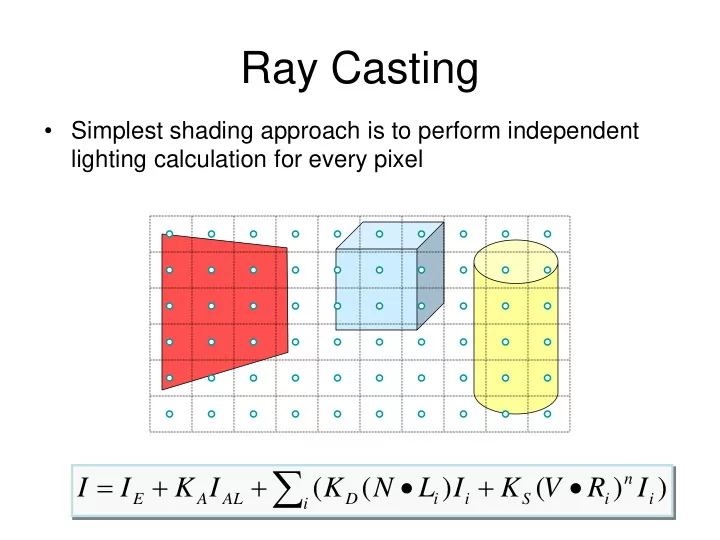
SLIDE 1 Ray Casting
- Simplest shading approach is to perform independent
lighting calculation for every pixel
) ) ( ) ( (
∑
+ =
i i n i S i i D AL A E
I R V K I L N K I K I I
SLIDE 2 Polygon Rendering Methods
- Given a freeform surface, one usually
approximates the surface as a polyhedra.
- How do we calculate in practice the
illumination at each point on the surface?
- Applying the illumination model at each
surface point is computationally expensive.
SLIDE 3 Polygon Shading
- Can take advantage of spatial coherence
– Illumination calculations for pixels covered by same primitive are related to each other
) ) ( ) ( (
∑
+ =
i i n i S i i D AL A E
I R V K I L N K I K I I
SLIDE 4
Piecewise linear approximation
SLIDE 5
Polygonal Approximation
SLIDE 6
Smooth Shading
SLIDE 7 Polygon Shading Algorithms
Gouraud Phong Wireframe Flat
Watt Plate 7
SLIDE 8 Flat Shading
What if a faceted object is illuminated only by directional light sources and is either diffuse or viewed from infinitely far away One illumination calculation per polygon Assign all pixels inside each polygon the same color
SLIDE 9 Flat Shading
- A fast and simple method.
- Gives reasonable result only if all of the following
assumptions are valid: – The object is really a polyhedron. – Light source is far away from the surface so that N•L is constant over each polygon. – Viewing position is far away from the surface so that V•R is constant over each polygon.
L V
SLIDE 10
Flat Shading
Objects look like they are composed of polygons
OK for polyhedral objects Not so good for ones with smooth surfaces
SLIDE 11 Gouraud Shading
- Produces smoothly shaded polygonal mesh
– Piecewise linear approximation – Need fine mesh to capture subtle lighting effects Gouraud Shading Flat Shading
SLIDE 12
Polygon Smooth Shading
SLIDE 13 Gouraud Shading
- What if smooth surface is represented by
polygonal mesh with a normal at each vertex?
) ) ( ) ( (
∑
+ =
i i n i S i i D AL A E
I R V K I L N K I K I I
Watt Plate 7
SLIDE 14 Gouraud Shading
- Smooth shading over adjacent polygons
– Curved surfaces
- Renders the polygon surface by linearly interpolating
intensity values across the surface. Mesh with shared normals at vertices
Watt Plate 7
SLIDE 15 Gouraud Shading
- One lighting calculation per vertex
– Assign pixels inside polygon by interpolating colors computed at vertices
SLIDE 16 Gouraud Shading
- 1. Determine the average unit normal at
each polygon vertex.
- 2. Apply an illumination model to each
vertex to calculate the vertex intensity.
- 3. Linearly interpolate the vertex
intensities over the surface polygon.
SLIDE 17 The normal vector at a vertex
The normal Nv of a vertex is an average of all neighboring normals:
∑ ∑
=
k k k k v
N N N | |
∑
=
k k v
N N
Which is simply the following normalized vector:
SLIDE 18 Bilinear by three linear interpolations
y
I1 I2 I3
scan line
x
IP
Two linear interpolations along the y-axis, and one along the x-axis.
SLIDE 19 Linear Interpolation
1
w
2
w I
a
I
b
I
b a
I w I w I
1 2
+ =
b a
I w I w I ) 1 (
2 2
− + =
b b a
I I I w I + − = ) (
2 a
I
b
I
1
w
2
w
SLIDE 20 Bilinear Interpolation
- Bilinearly interpolate colors at vertices
down and across scan lines
SLIDE 21 Bilinear Interpolation
- Ia = (Ys - Y2) / (Y1 - Y2) * I1 + (Y1 - Ys) / (Y1 - Y2) * I2
Ib = (Ys - Y3) / (Y1 - Y3) * I1 + (Y1 - Ys) / (Y1 - Y3) * I3 Ip = (Xb - Xp) / (Xb - Xa) * Ia + (Xp - Xa) / (Xb - Xa) * Ib
SLIDE 22
Gouraud Shading of a sphere
SLIDE 23
Phong Shading
A more accurate method for rendering a polygon surface is to interpolate normal vectors, and then apply the illumination model to each surface point.
SLIDE 24
Flat Gouraud Phong
SLIDE 25 Phong Shading
- 1. Determine the average unit normal at
each polygon vertex.
- 2. Linearly interpolate the vertex normals
- ver the surface polygon.
- 3. Apply the illumination model along each
scan line to calculate pixel intensities for each surface point.
SLIDE 26 Phong Shading
- What if polygonal mesh is too coarse to capture illumination effects
in polygon interiors?
) ) ( ) ( (
∑
+ =
i i n i S i i D AL A E
I R V K I L N K I K I I
SLIDE 27 Phong Shading
One lighting calculation per pixel; Approximate surface normals for points inside polygons by bilinear interpolation of normals from vertices
SLIDE 28 Phong Shading
- Bilinearly interpolate surface normals at vertices down
and across scan lines
SLIDE 29
Flat Shading Gouraud Shading Phong Shading
SLIDE 30
Diffuse surface With additional specular component
SLIDE 31 Polygon Shading Algorithms
Gouraud Phong Wireframe Flat
Watt Plate 7
SLIDE 32 Shading Issues
- Problems with interpolated
shading:
– Polygonal silhouettes – Perspective distortion – Orientation dependence (due to bilinear interpolation) – Problems at T-vertices – Problems computing shared vertex normals
SLIDE 33 One shade or color for the entire object, e.g., there really is no shading being done A Pixar Shutterbug example image with faceted shading.
SLIDE 34 A Pixar Shutterbug example image with Gouraud shading and no specular highlights. A Pixar Shutterbug example image with faceted shading.
SLIDE 35 A Pixar Shutterbug example image with Gouraud shading and no specular highlights. A Pixar Shutterbug example image with Gouraud shading and specular highlights.
SLIDE 36 Summary
- 2D polygon scan conversion with a
sweep-line algorithm
– Flat – Gouraud – Phong
Less expensive More accurate
SLIDE 37 Global Illumination
In the real world light is everywhere.
- Reflects in every direction from
every surface onto every surface.
- Anywhere in the world, light
comes from infinite directions around. In the lighting equation we used the Ambient intensity to approximate this.
SLIDE 38 Ambient Occlusion
- Full GI still too expensive for full feature
film.
- Ambient Occlusion is used in most modern
films to simulate indirect lighting in an
- vercast day.
- Usually, rendered separately and ‘baked’
as texture or 3D data that modifies values
SLIDE 39
SLIDE 40
SLIDE 41 AO - advantages
- Much cheaper than GI.
- Usually does not depend on lighting, looks
- k with most light settings.
- Can be computed once for each scene
and reused for every frame.
SLIDE 42
SLIDE 43
SLIDE 44
SLIDE 45
SLIDE 46
SLIDE 47
SLIDE 48
SLIDE 49
SLIDE 50 Three Point Lighting
- Basic and commonly used lighting technique
- 1. Key light
- 2. Fill light
- 3. Back light
SLIDE 51 Key light
- Creates the subject's main illumination, and
defines the most visible lighting and shadows.
- Simulates main source of illumination
SLIDE 52 Fill light
- Softens and extends the illumination, simulates
secondary light sources
- At most, half as bright as your key light,
- usually, casts no shadow
SLIDE 53 Back light
- creates a "defining edge" to help visually
separate the subject from the background