Transport Protocols End-to-End Protocols Convert host-to-host - - PowerPoint PPT Presentation

transport protocols end to end protocols
SMART_READER_LITE
LIVE PREVIEW

Transport Protocols End-to-End Protocols Convert host-to-host - - PowerPoint PPT Presentation

Transport Protocols End-to-End Protocols Convert host-to-host packet delivery service into a process-to-process communication channel Demultiplexing: Multiple applications can share the Kameswari Chebrolu network Dept. of Electrical


slide-1
SLIDE 1

Transport Protocols

Kameswari Chebrolu

  • Dept. of Electrical Engineering, IIT Kanpur

End-to-End Protocols

Convert host-to-host packet delivery service into

a process-to-process communication channel

Demultiplexing: Multiple applications can share the

network

End points identified by ports

Ports are not interpreted globally servers have well defined ports (look at /etc/services)

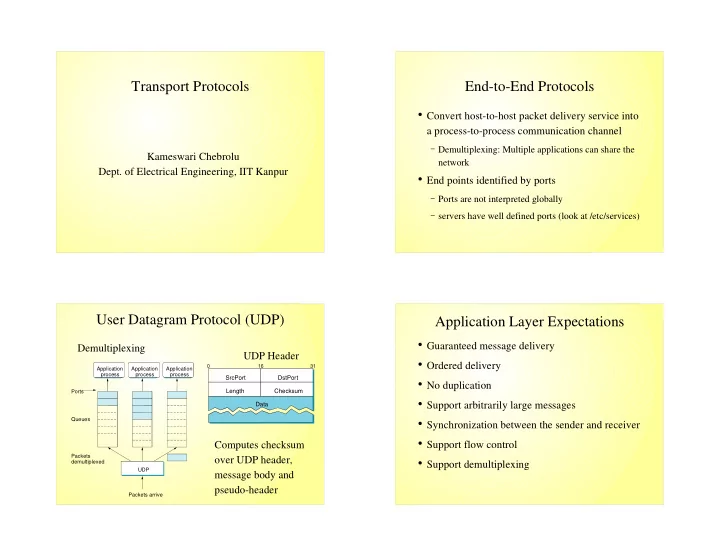
User Datagram Protocol (UDP)

SrcPort DstPort Checksum Length Data

16 31 Application process Application process Application process UDP Packets arrive Ports Queues Packets demultiplexed

Demultiplexing UDP Header Computes checksum

  • ver UDP header,

message body and pseudo-header

Application Layer Expectations

Guaranteed message delivery Ordered delivery No duplication Support arbitrarily large messages Synchronization between the sender and receiver Support flow control Support demultiplexing

slide-2
SLIDE 2

Limitations of Networks

Packet Losses Re-ordering Duplicate copies Limit on maximum message size Long delays

Transmission Control Protocol (TCP)

Connection oriented

Maintains state to provide reliable service

Byte-stream oriented

Handles byte streams instead of messages

Full Duplex

Supports flow of data in each direction

Flow-control

Prevents sender from overrunning the receiver

Congestion-control

Prevents sender from overloading the network

TCP Cont...

Application process Write bytes TCP Send buffer Segment Segment Segment Transmit segments Application process Read bytes TCP Receive buffer

Sliding Window: Data Link vs Transport

P2P: Dedicated Link -- Physical Link connects the same two computers TCP: Connects two processes on any two machines in the Internet

  • Needs explicit connection establishment phase to exchange state

P2P: Fixed round trip transmission time (RTT) TCP: Potentially different and widely varying RTTs

  • Timeout mechanism has to be adaptive

P2P: No Reordering TCP: Scope for reordering due to arbitrary long delays

  • Need to be robust against old packets showing up suddenly
slide-3
SLIDE 3

Sliding Window: Data Link vs Transport

P2P: End points can be engineered to support the link TCP: Any kind of computer can be connected to the Internet

Need mechanism for each side to learn other side's resources

(e.g. buffer space) -- Flow control P2P: Not possible to unknowingly congest the link TCP: No idea what links will be traversed, network capacity can dynamically vary due to competing traffic

  • Need mechanism to alter sending rate in response to network

congestion – Congestion control

TCP Header Format

Options (variable) Data Checksum SrcPort DstPort HdrLen Flags UrgPtr AdvertisedWindow SequenceNum Acknowledgment 4 10 16 31 Sender Data (SequenceNum) Acknowledgment + AdvertisedWindow Receiver

Connection Establishment

Active participant

(client) (server) SYN, SequenceNum = x ACK, Acknowledgment =y+1 A c k n

  • w

l e d g m e n t = x + 1 S Y N + A C K , S e q u e n c e N u m = y ,

State Transition Diagram

slide-4
SLIDE 4

Protection Against Wraparound

Wraparound occurs because sequence number

field is finite

32 bit sequence number space

Maximum Segment Lifetime (MSL) is 120 sec

Bandwidth Time until Wraparound T1 (1.5Mbps) 6.6 hrs Ethernet (10Mbps) 57 minutes T3 (45 Mbps) 13 minutes FDDI (100Mbps) 6 minutes STS-3 (155Mbps) 4 minutes STS-12 (622Mbps) 55 seconds STS-24 (1.2Gbps) 28 seconds

Sliding Window Recap

Sending application LastByteWritten TCP LastByteSent LastByteAcked Receiving application TCP LastByteRead NextByteExpected LastByteRcvd

Sending Side:

LastByteAcked <= LastByteSent LastByteSent <= LastByteWritten Buffer bytes between

LastByteAcked and LastByteWritten Receiving Side:

LastByteRead <= NextByteExpected NextByteExpected <=

LastByteRcvd+1

Buffer bytes between LastByteRead

and LastByteRcvd

Flow Control

Buffers are of finite size

MaxSendBuffer and MaxRcvBuffer

Receiving side:

LastByteRcvd – LastByteRead <= MaxRcvBuffer AdvertisedWindow = MaxRcvBuffer – ((NextByteExpected – 1) –

LastByteRead)

Sending side:

LastByteSent – LastByteAcked <= AdvertisedWindow EffectiveWindow = AdvertisedWindow – (LastByteSent –

LastByteAcked)

LastByteWritten – LastByteAcked <= MaxSendBuffer Persist when AdvertisedWindow is zero

At steady state use Self-clocking

Acks pace transmission of packets

Challenges:

How to determine available capacity? How to adjust sending rate to varying capacity?

Congestion Control

slide-5
SLIDE 5

Congestion Avoidance: Additive Increase/Multiplicative Decrease

Introduce a new variable: CongestionWindow

Limits the amount of data in transit MaxWindow = Minimum of

(CongestionWindow,AdvertisedWindow)

EffectiveWindow = Maxwindow – (LastByteSent –

LastByteAcked)

Adjust CongestionWindow to changes in capacity

Decrease CongestionWindow when congestion goes up Increase CongestionWindow when congestion goes down

AIMD Cont...

Problem: How do we detect congestion? Answer: Timeouts

TCP interprets timeout as a result of congestion

Multiplicative decrease: Cut CongestionWindow by half

  • n each timeout

Additive Increase: Increase CongestionWindow by

Maximum Segment Size (MSS) per RTT

In practice, increment a little on each ack, CongestionWindow += Increment Increment = MSS * (MSS/CongestionWindow)

Saw Tooth Pattern

60 20 1.0 2.0 3.0 4.0 5.0 6.0 7.0 8.0 9.0 Time (seconds) 70 30 40 50 10 10.0

Slow Start

AIMD approach is used at steady state But how to get to steady state? Increase Congestion Window exponentially

Begin with CongestionWindow = 1 Double CongestionWindow every RTT

“Slow” compared to sending entire advertised

window all at once

Used during beginning of connection Used when connection goes dead due to timeout

slide-6
SLIDE 6

Congestion Window vs Time

Cwnd Cwnd/2 Slow Start Waiting for Timeout Timeout Slow Start Congestion Avoidance Time

Fast Retransmit/Fast Recovery

Packet 1 Packet 2 Packet 3 Packet 4 Packet 5 Packet 6 Retransmit packet 3 ACK 1 ACK 2 ACK 2 ACK 2 ACK 6 ACK 2

Sender Receiver

Fast Retransmit: Use duplicate acks to trigger retransmission Fast Recovery: Peform congestion avoidance instead of slow start

RTT Estimation: Original Algorithm

Measure SampleRTT for sequence/ack combo EstimatedRTT = a*EstimatedRTT + (1-a)*SampleRTT

a is between 0.8-0.9 small a heavily influenced by temporary fluctuations large a not quick to adapt to real changes

Timeout = 2 * EstimatedRTT

slide-7
SLIDE 7

Jacobson/Karels Algorithm

Incorrect estimation of RTT worsens congestion Algorithm takes into account variance of RTTs

If variance is small, EstimatedRTT can be trusted If variance is large, timeout should not depend

heavily on EstimatedRTT

Jacobson/Karels Algorithm Cont..

Difference = SampleRTT - EstimatedRTT EstimatedRTT = EstimatedRTT + ( d *

Difference)

Deviation = Deviation + d ( |Difference| -

Deviation)), where d ~ 0.125

Timeout = u * EstimatedRTT + q * Deviation,

where u = 1 and q = 4

Exponential RTO backoff

  • Summary

Transport protocols essentially demultiplexing

functionality

Examples: UDP, TCP, RTP TCP is a reliable connection-oriented byte-stream

protocol

Sliding window based Provides flow and congestion control